
Step 3 of 12 in Stock materials and finished goods
Receiving page in inventory from production
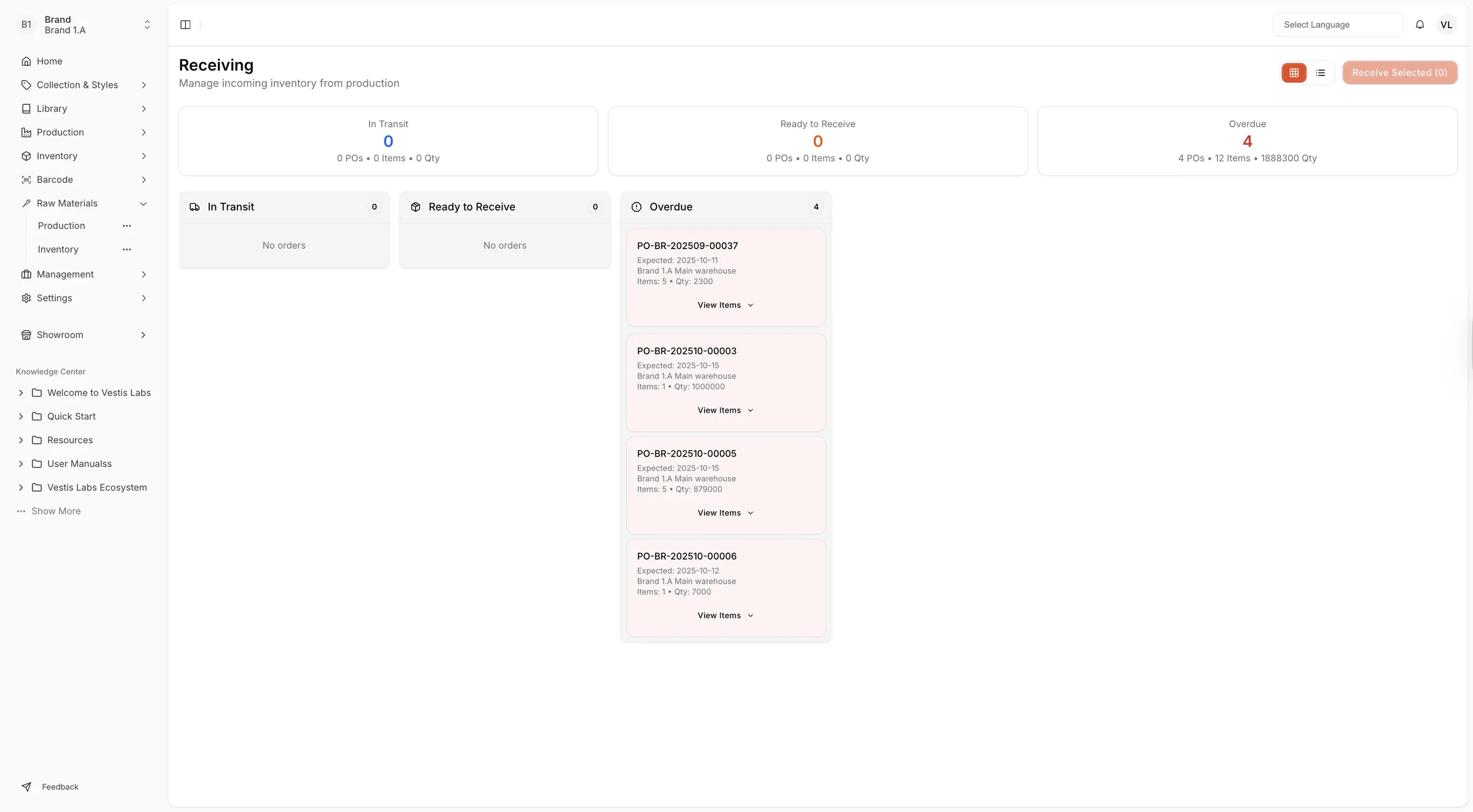
The Receiving page provides an overview of all incoming inventory transfers from production to the warehouse.
Under review. This page is published while we check it against the live app, so some details may have changed.
Screenshots may be out of date.
The Receiving page provides an overview of all incoming inventory transfers from production to the warehouse. It allows users to monitor and manage the status of purchase or production orders that are in transit, ready to be received, or overdue.
Materials Production & InventoryInventoryReceiving
Permission: VIEW_MATERIAL_INVENTORY
Three summary cards at the top of the page show the number of POs, items and quantity (Qty) for In Transit, Ready to Receive and Overdue. Orders are also listed in a column for each status. Use the board and list buttons at the top right to switch between a board and a table view.
In Transit
Displays all orders currently being shipped from production that have not yet arrived. Shows the total number of POs, items, and quantities still in transit.
Ready to Receive
List orders that have arrived and are ready to be checked in or received into the warehouse system. Displays a summary of pending receipts waiting for confirmation.
Overdue
Shows any orders that have passed their expected receiving date. Helps identify delays or missed receipts for follow-up.
Receive items
Select the items
Check the items you have received, or use Select All Items on an order.
Click "Receive Selected"
Click Receive Selected at the top right. The number of selected items is shown in brackets. You can also click Receive on a single order.
Check the quantities
In the Confirm Receiving Items window, review each item. Click Change Qty to enter a smaller quantity; the Max shown is the most you can receive.
Click "Confirm Receive"
Click Confirm Receive to record the items as received. Click Cancel to close the window without receiving anything.